サンプルはGoogle Chrome 12、Firefox 4にて動作確認しております。
pushStateを使用していないサンプル
jQueryのloadメソッドを使用したコンテンツ切り替えの簡単なサンプルです。
<!DOCTYPE html><html lang="ja"><head><meta charset="utf-8"><title>page1</title><link rel="stylesheet" href="style.css"><script type="text/javascript" src="jquery1.5.1.js"></script><script type="text/javascript" src="pushstate.js"></script></head><body><h1>page1.html</h1><article> <section> <p>page1.html</p> </section></article><footer><ul> <li><a href="page1.html">page1</a></li> <li><a href="page2.html">page2</a></li></ul></footer></body></html>ほとんど同じ内容でpage2.htmlを作成します。
読み込んだ「pushstate.js」はとりあえず次のようにします。
$(function() { $('footer a').click(function(e) { e.preventDefault(); var nextPage = $(this).attr('href'); changeContents(nextPage); }); function changeContents(url) { $('article').load(url+' section'); }});footer部分のナビゲーションをクリックするとsectionが次のページの内容に切り替わります。
pushStateで履歴を残す
pushStateで残る履歴はSession historyというものでブラウザの履歴画面には残らず、ChromeやFirefoxでしたら戻るボタンや進むボタンを長押しにすることで表示されます。
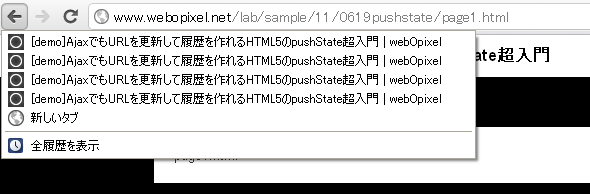
履歴を残すだけならクリックイベントのところに「window.history.pushState(null, null, nextPage);」を追加します。
第3引数に追加した文字列にURLが切り替わります。
$('footer a').click(function(e) { e.preventDefault(); var nextPage = $(this).attr('href'); changeContents(nextPage); window.history.pushState(null, null, nextPage);});戻るボタンで前のコンテンツを表示する。
これでURLが切り替わり履歴も残るのですが、戻るボタンを押してもコンテンツはそのままですね。
戻るボタンでコンテンツも前のものを表示させるには「popstate」でイベントを取得してコンテンツを切り替える処理を記述する必要があります。
window.addEventListener('popstate', function(event) { changeContents(location.pathname);},false );またaddEventListenerの部分は「onpopstate = function(event)」ようにも記述できます。
機能的に最低限すぎる感じですが、とりあえずこれで動くのかなとか。
$(function() { $('footer a').click(function(e) { e.preventDefault(); var nextPage = $(this).attr('href'); changeContents(nextPage); window.history.pushState(null, null, nextPage); }); //戻る・進むボタンを押したとき onpopstate = function(event) { changeContents(location.pathname); } //コンテンツの切り替え function changeContents(url) { $('article').load(url+' section'); }});